
FHO+ RA Summary Tool · Stewart Medicine
Make sense of your OHIP payments.
Turn your MCEDT Remittance Advice files into clear monthly summaries, detailed payment breakdowns and an hourly billing audit.
$149 + HST, one time. No subscription.
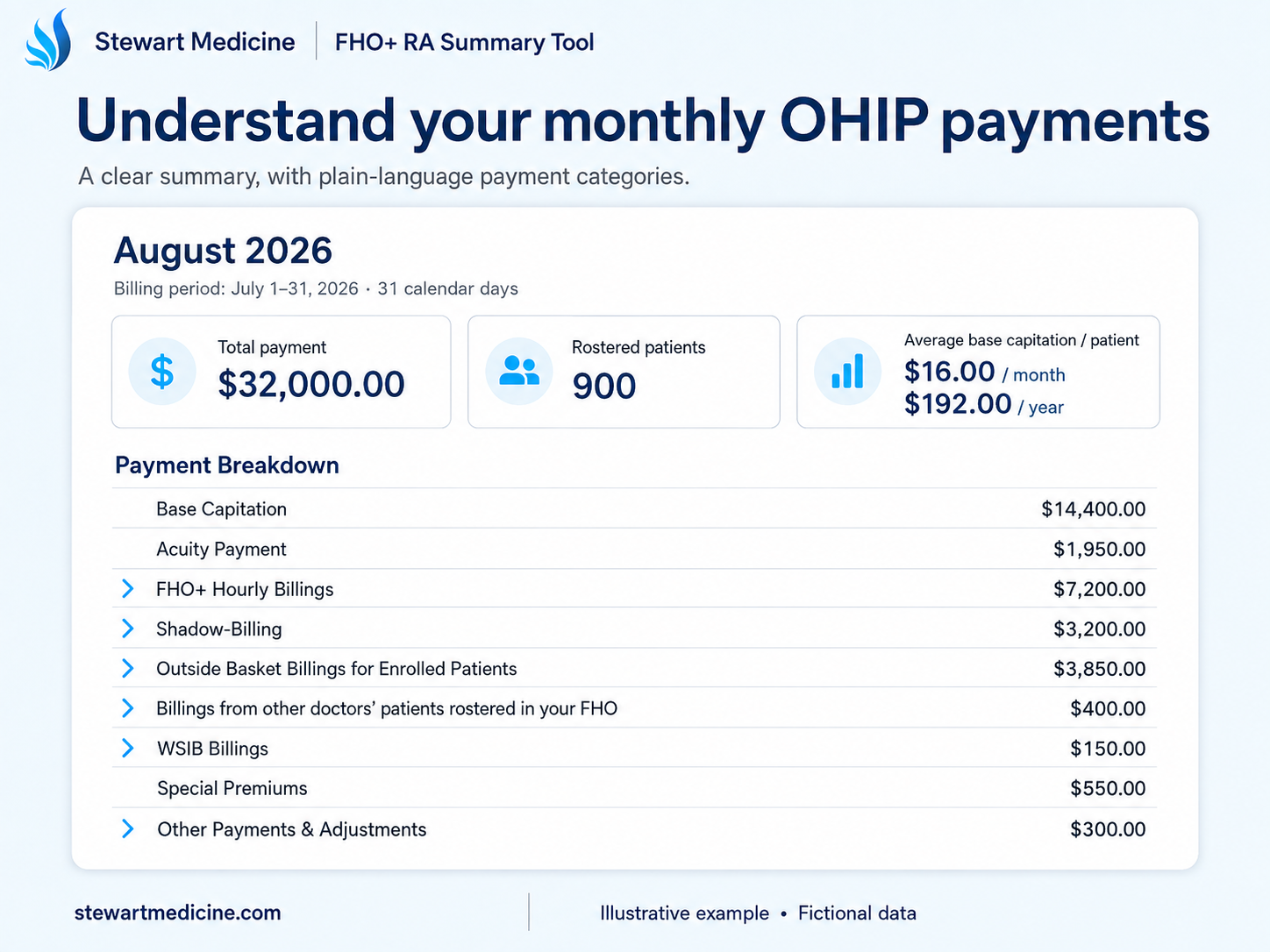
Built for FHO+ physiciansUnderstand your RA and identify dates worth checking.
Works with official MCEDT RAsNo connection to your EMR is required.
Processed on your computerYour imported reports stay in the local tool.
Watch the video
See it in action.
A quick introduction to the FHO+ RA Summary Tool.
Make sense of your monthly payments, explore fee-code details, compare months and take a second look at your hourly billings.
The Hourly Audit
A second look at the days you worked.
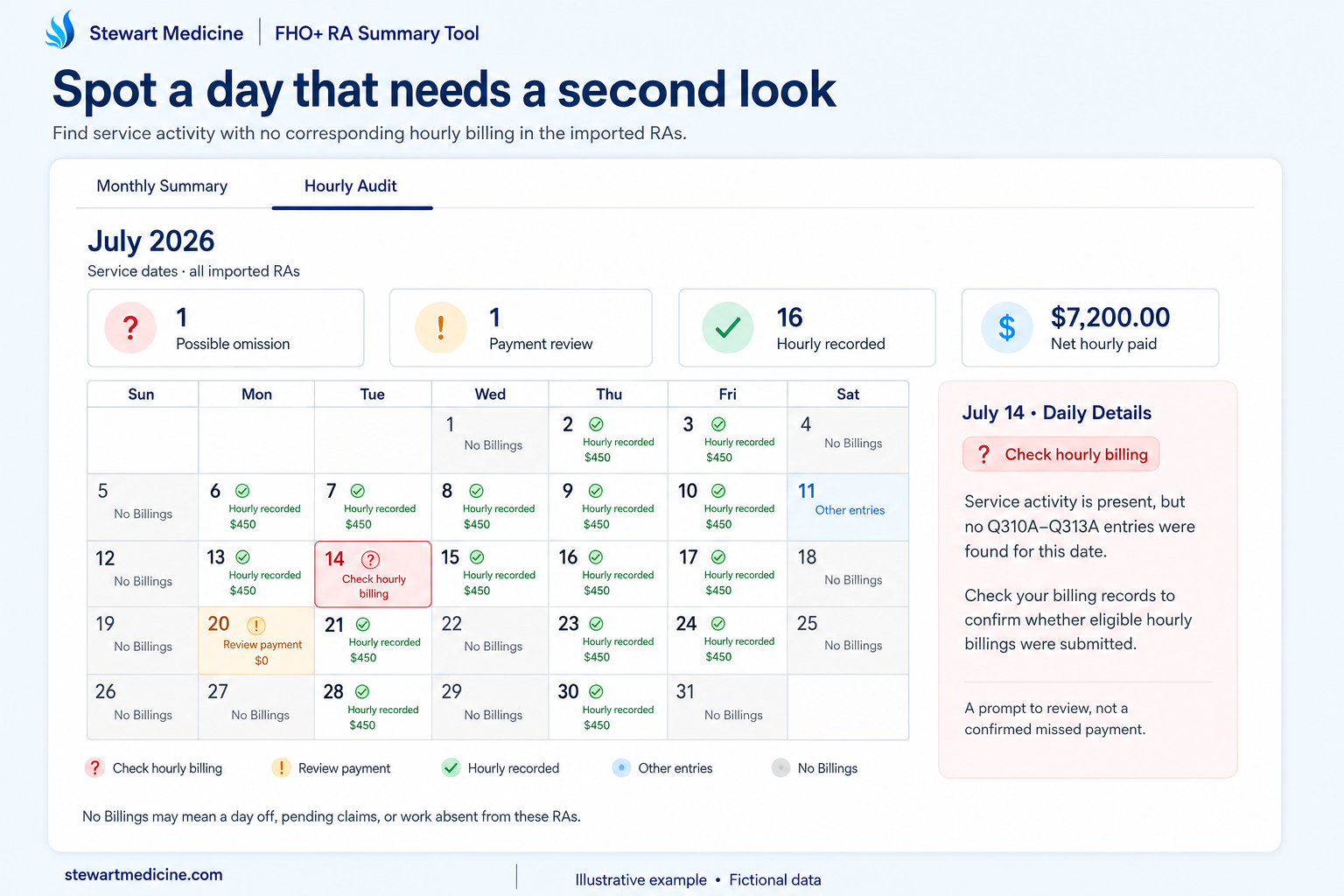
Busy days can leave gaps in billing. The calendar highlights dates with service activity but no corresponding Q310–Q313 hourly entry in the RAs you imported.
Open a date to review its codes and payments, then check your own billing records.
One missed billing day could pay for your tool.
Finding and successfully billing an eligible missed day could more than cover the one-time purchase price.
Illustration: 6 eligible Q310A hours
$480at the published $80/hour base rate
Tool cost: $168.37 including HST
Illustration before relativity adjustments. Recovery depends on eligibility, your records, billing deadlines and OHIP acceptance; it is not guaranteed. Ministry hourly-rate bulletin.
“I’ve found days missed using my own tools!”
Dr. Adam Stewart, on reviewing his own hourly billings
Your monthly picture
Clear totals. Plain-language categories.
See your total payment, billing period, roster size and average base capitation per patient. Understand how much came from capitation, acuity, FHO+ hourly billings, shadow-billing, outside-basket billings and other payments.
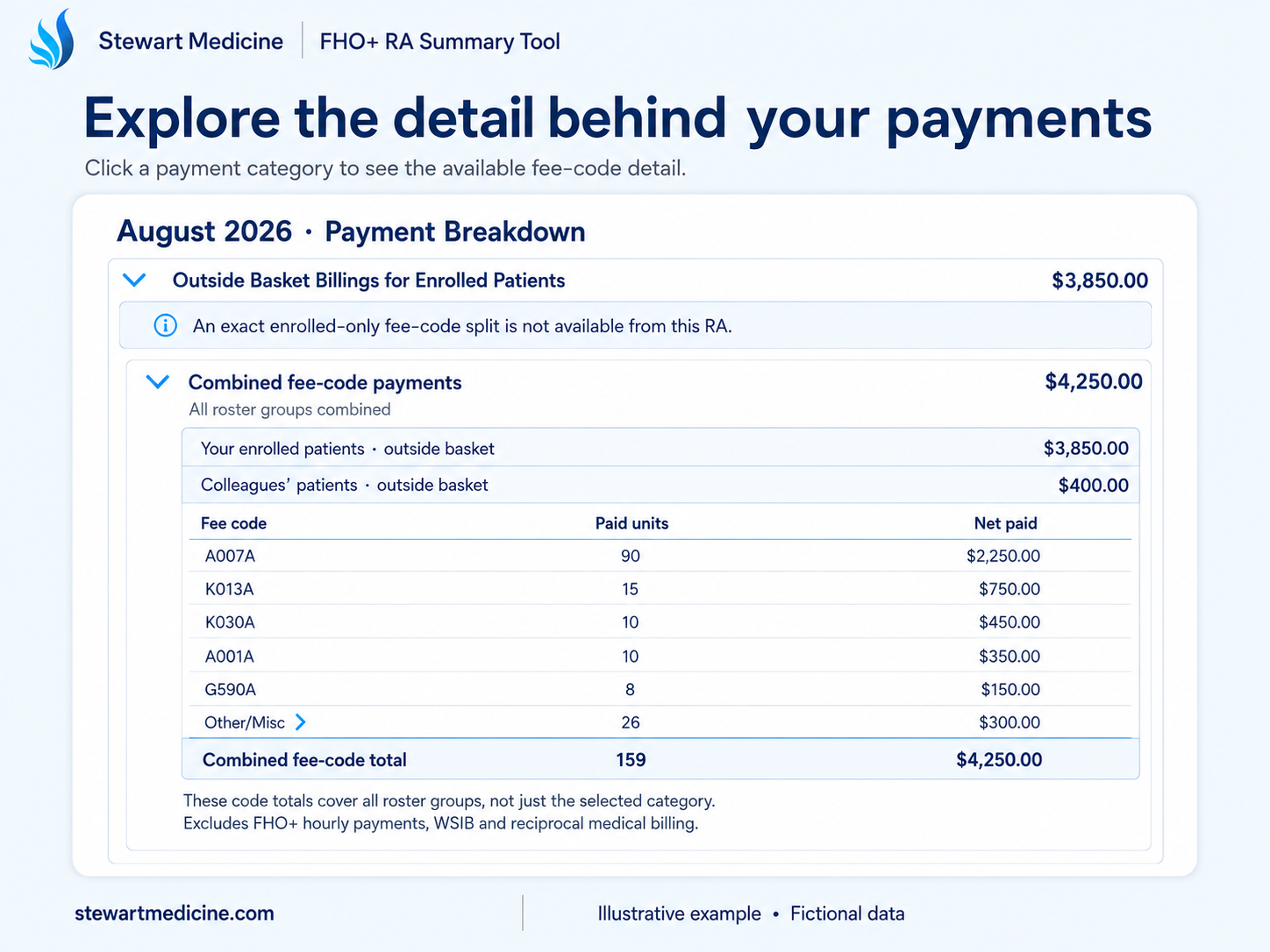
Open the detail when you need it.
Expand supported payment lines to explore fee codes, counts and payment totals. Review Q310–Q313 payments, shadow-billing premiums, WSIB codes and available adjustments.
For outside-basket billings, the RA provides a category total; the available claim-code detail combines roster groups. The tool makes that distinction clear.
Keep an eye on premiums and bonuses. The Special Premiums & Bonus Progress section shows available qualifying activity and payments, so useful details are easier to find.
See the pattern over time
Compare month after month.
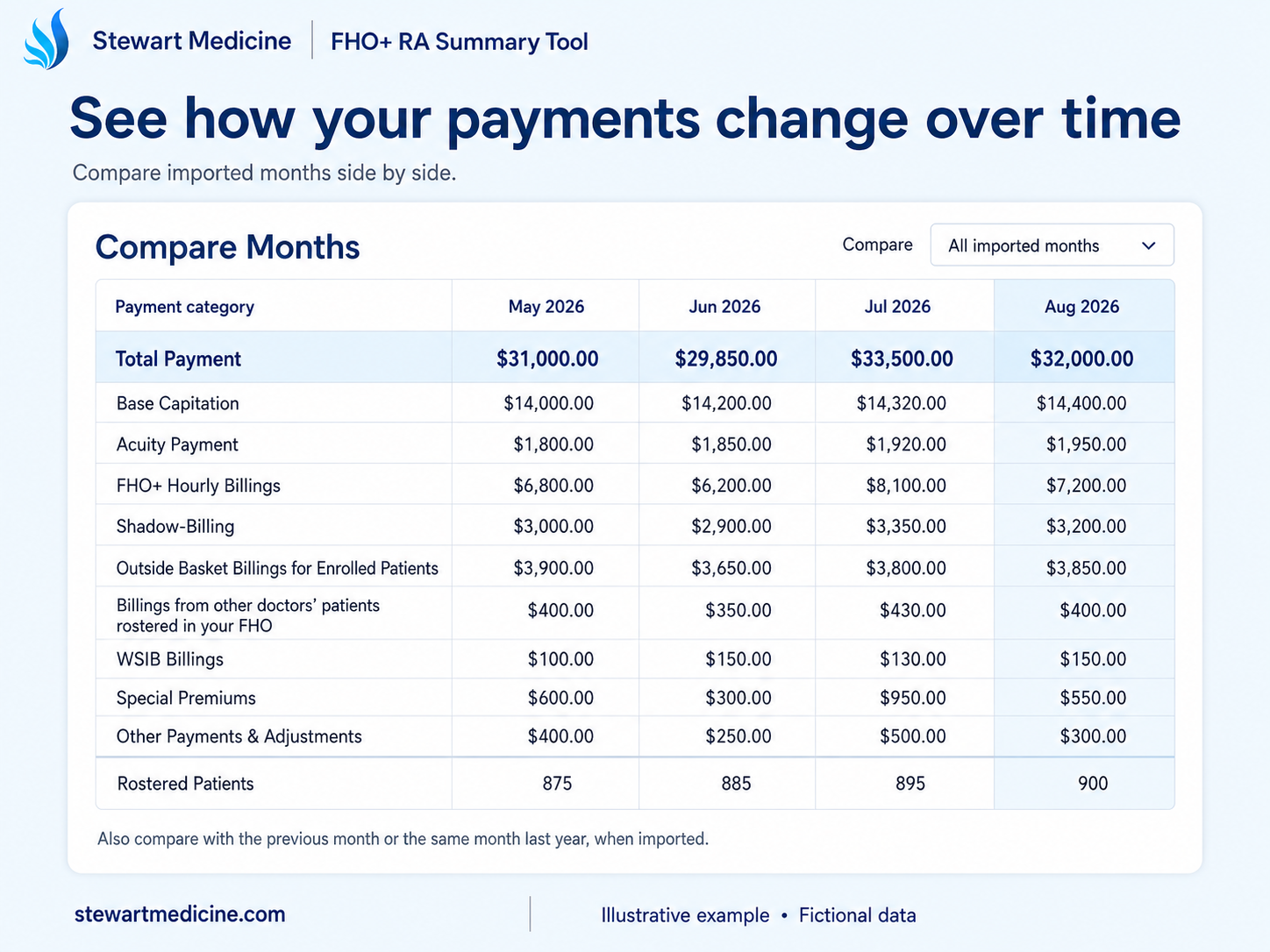
View imported months side by side to understand changes in payment categories and roster size. Compare with the previous month or the same calendar month last year when those reports are available.
A simple monthly routine.
- 01 / IMPORT
Download your official RAs.
Save your Remittance Advice files from MCEDT, then import one or several months into the tool.
- 02 / REVIEW
Understand your payments.
Explore your monthly summary, open payment details, compare months and check dates flagged by the Hourly Audit.
- 03 / KEEP YOUR HISTORY
Pick up where you left off.
Choose Download History File before closing. Next time, use Open Saved History, add your new RAs and download the updated history.
Get your copy
One physician. One personalized tool.
Your copy is prepared for your name and six-digit OHIP billing number. Purchase directly from Stewart Medicine Professional Corporation.
One-time licence
$149 + HST
No subscription.
- Licence
- $149.00
- HST (13%)
- $19.37
- Total to e-Transfer
- $168.37
- Monthly summaries and payment details
- Month-to-month comparisons
- Hourly Audit
- Minor updates released within the following six months
- Use by you and your delegated staff, for your billing number
Use the delivered version indefinitely under the licence terms. Major upgrades and later updates are not included.
Download and sign the agreement.
Complete your purchaser details, including all six digits of your OHIP billing number, and sign the PDF.
Download purchaser agreement (PDF)Email your completed agreement.
Attach the signed PDF and send it to emr.consulting@stewartmedicine.com.
Send your e-Transfer.
Using your banking app or website, send $168.37 to emr.consulting@stewartmedicine.com. Include the purchaser’s name in the message so your payment can be matched to your agreement.
Receive your tool and receipt by email.
Once your signed agreement and payment are received, Stewart Medicine will email your personalised HTML app and receipt. Open the app in desktop Chrome to get started.
Final sale, subject to the agreement’s functionality guarantee and rights that cannot legally be excluded. The guarantee covers assistance and repair or a working replacement for material faults with supported files and browsers; it does not guarantee additional OHIP payments. Read the full terms (PDF).
A few practical questions.
Will this work with my EMR?
The preferred input is the official MCEDT Remittance Advice file, so no EMR connection or specific EMR is needed. The tool supports individual-physician MCEDT RAs. PS Suite tab-delimited text exports can also be used, with less detail and potentially less accurate allocations; original RAs are needed for the daily Hourly Audit. PDFs and other MCEDT report types are not substitutes for the RA file.
Do I upload patient information to Stewart Medicine?
No. The HTML tool processes imported RAs in your browser on your computer. You do not send the RA files to Stewart Medicine to run the tool. Original RAs contain personal health information, and saved history contains confidential, potentially identifiable billing data. Store both securely, restrict access and do not email patient information for support.
Does it automatically save my reports?
No. Download your separate history file before closing or refreshing. Reopen that file in the tool next time, add new RAs, then download the combined history. The app includes instructions for this monthly routine.
Can my billing staff use it? What about another computer?
Yes. You and your delegated staff may use your copy for your licensed OHIP billing number, including on multiple computers. Transfer the app and your latest history using secure, clinic-approved storage. A separate licence is required for each other doctor; this is not a clinic-wide licence.
Does an audit flag mean I am owed money?
A flag identifies a date worth reviewing. It does not confirm eligibility, a missed submission or a recoverable payment. Check your time records, submissions, later RAs and applicable deadlines. A day marked “No Billings” may be a day off, pending claims, or work that never appeared in the imported files.
What if the tool does not work with my reports?
Contact emr.consulting@stewartmedicine.com. The purchaser agreement guarantees material summary and audit functionality for supported individual-physician MCEDT RAs and desktop Chrome current at delivery, with assistance and repair or a working replacement at no charge within a reasonable time. Minor updates released within six months after payment and initial delivery are included. Full conditions are in the purchaser agreement.
Stewart Medicine Professional Corporation
Independent physician-developed tool. Not endorsed by OHIP.
Questions before purchasing?
emr.consulting@stewartmedicine.com